How to Print JAMB Result Slip 2026
If you have written the 2026 Unified Tertiary Matriculation Examination (UTME), one of the most important documents you will need during the admission process is your JAMB Original Result Slip. This document is required by most universities, polytechnics, colleges of education, and other tertiary institutions during Post-UTME registration, admission screening, and clearance.
Unlike the free UTME result you can check online or through SMS, the Original JAMB Result Slip contains additional details such as your passport photograph, registration number, institution choice, subject scores, total score, and other security features that make it an official admission document.
The Joint Admissions and Matriculation Board (JAMB) has made it possible for candidates to print their Original Result Slip online through the JAMB e-Facility portal after paying the prescribed printing fee. In this guide, you'll learn how to print your JAMB Result Slip for 2026, the official printing fee, the requirements you'll need, common problems you may encounter, and how to resolve them.
Is the JAMB Original Result Slip for 2026 Out?
Yes. The Joint Admissions and Matriculation Board (JAMB) has activated the portal for candidates to print their 2026 Original UTME Result Slip. Candidates who sat for the 2026 UTME can now access and print the document through the JAMB e-Facility portal after paying the required printing fee.
If you have already checked your UTME result, you can proceed to print the Original Result Slip at any time. There is no need to wait until your preferred institution begins Post-UTME registration, as the slip is available once the portal is activated.
How Much Does It Cost to Print the JAMB Result Slip?
JAMB charges an official ₦1,500 fee to print the Original UTME Result Slip.If you choose to print the slip yourself through the JAMB e-Facility portal, you will only pay the official fee. However, if you visit an accredited CBT centre or cyber café, you may be charged an additional service fee for processing and printing the document.
Once your payment is successful, you can immediately download and print your Original JAMB Result Slip. If you do not have access to a printer, you can save the slip as a PDF file and print it later at any cyber café or CBT centre.
How to Print JAMB Result Slip 2026
Printing your JAMB Original Result Slip is a simple process that can be completed online through the JAMB e-Facility portal. Follow the steps below carefully.
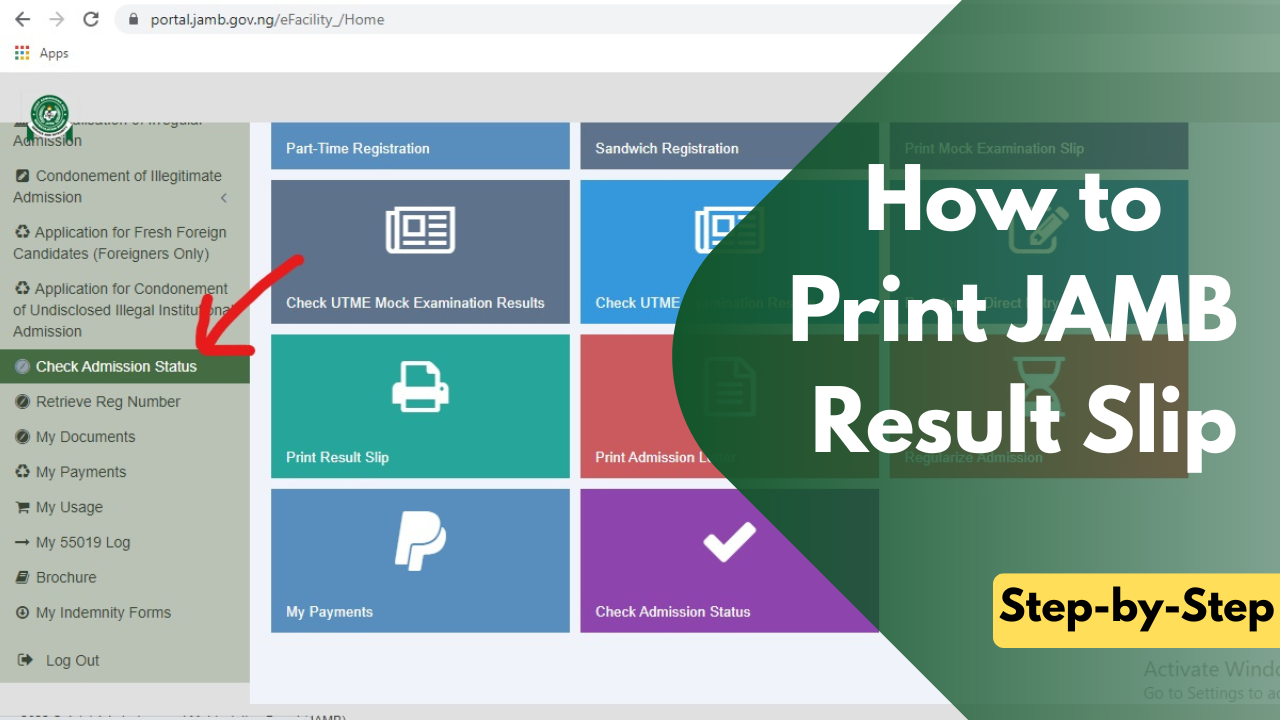
- Open your web browser and go to the official JAMB e-Facility portal. This is the only platform where you can securely access and print your Original Result Slip.
- Enter the email address and password you used during your JAMB registration, then click Login to access your profile dashboard.
- After logging in, locate the Print Result Slip option from the list of available services and click on it.
- If you have not already paid for the service, you will be prompted to pay the official ₦1,500 printing fee. Complete the payment using any of the available payment methods.
- Once your payment is successful, your examination details will be displayed. Carefully review your information to ensure your name, registration number, examination year, and scores are correct.
- Click the Print Result Slip button to generate your Original UTME Result Slip. The document will be displayed in PDF format.
- Download the PDF to your device and print it. If possible, print the document in colour, as some institutions prefer coloured copies because they clearly display your passport photograph and security features.
After printing, verify that all the information on the result slip is accurate before using it for any admission-related process.
Frequently Asked Questions (FAQs)
Can I print my JAMB Result Slip with my phone?
- Yes. You can log in to the JAMB e-Facility portal using your smartphone, pay the required fee, and download the Original Result Slip as a PDF. If you do not have a printer, you can save the file and print it later at a cyber café or CBT centre.
How much does it cost to print the JAMB Result Slip?
- JAMB charges an official fee of ₦1,500 to print the Original UTME Result Slip. If you use a CBT centre or cyber café, you may pay an additional service charge.
Is the JAMB Original Result Slip compulsory?
- Yes. The Original Result Slip is required by most universities, polytechnics, and colleges of education for Post-UTME registration, admission screening, and clearance. It is one of the most important documents you'll need during the admission process.
Can I print my JAMB Result Slip more than once?
- Yes. Once you have paid the printing fee, you can reprint your Original Result Slip whenever necessary by logging into your JAMB profile.
Can I print the JAMB Result Slip without paying?
- No. The Original Result Slip is a paid service provided by JAMB. You must pay the official ₦1,500 fee before you can access and print it.
What is the difference between the JAMB Result Slip and the Original Result Slip?
- The free JAMB result simply shows your UTME scores. The Original Result Slip is the official document that contains your passport photograph, registration details, institution choice, subject scores, total score, and other security features required for admission.
How many copies of my JAMB Result Slip should I print?
- It is advisable to print at least two or three copies. This ensures you have spare copies for Post-UTME registration, admission screening, and future reference.
We hope this guide has helped you understand how to print your JAMB Result Slip without any difficulty. If you found this article helpful, share it with other JAMB candidates so they can also learn how to print their Original Result Slip successfully.
If you have any questions or encounter any challenges during the process, drop your question in the comments section below, and we'll be happy to help.